

How to Test a Power Supply (PSU): Paperclip, Multimeter & Load Testing Guide
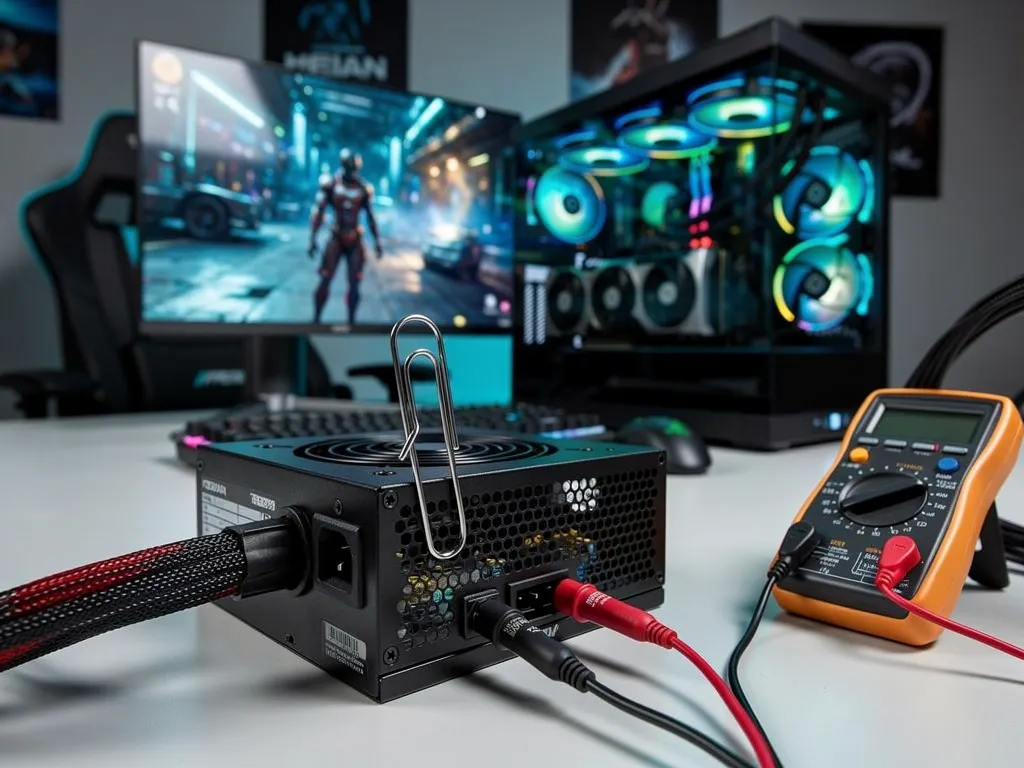
Power supply testing requires switching off the I/O switch, unplugging the AC cord, then disconnecting all cables before jumping the correct pins with a paper clip or PSU jumper. The fan spinning confirms the unit functions. Faulty results signal replacement time—XOTIC PC's custom gaming desktops ship with tested, validated power supplies built for reliable performance.
What Do You Need Before Testing a Power Supply?
Two items separate a five-minute diagnosis from a wasted afternoon: a simple jumper tool and a clear head about safety. Builders chasing a dead system don't need a workbench full of lab gear — a basic power supply test starts with equipment most toolboxes already have.
What's the minimum tool needed to test a PSU at home?
A paper clip or a dedicated PSU jumper handles the job for anyone facing a system that won't power on. Nothing fancier is required for this first-pass check, which makes it the natural starting point before assuming the worst.
Do gamers ever need lab-grade testing equipment?
Advanced diagnostics call for calibrated voltmeters and current meters, with resolution set at ten times the parameter under measurement. That level of precision belongs to technicians chasing subtle load issues, not the average builder troubleshooting a silent rig at home.
Before touching a single wire, confirm the setup:
- Gather a paper clip or PSU jumper.
- Power down the system fully and unplug the AC cord.
- Clear a well-lit, static-free workspace.
- Keep the PSU's cable bundle accessible for the pin check ahead.
Builders skip this hassle entirely with XOTIC PC. Every system ships assembled, wired, tuned, and tested in-house by the Lincoln, Nebraska team, and ready-to-ship desktops and laptops leave the warehouse pre-built and pre-tested — factory-validated hardware, zero guesswork.
How Do You Run the Paperclip Jump-Start Test?
A paperclip jump-start test, also known as a PSU jumper test, forces a suspect power supply to fire up without the motherboard involved, exposing a dead unit in minutes. Skipping the safety prep beforehand risks a shock, a fried connector, or a wasted afternoon chasing the wrong culprit. Builders searching for how to test power supply function fast use this exact paperclip test power supply method because it isolates the PSU from every other component on the bench.
Gather a paperclip or a dedicated PSU jumper before starting. Nothing else is required.
- Flip the power supply's I/O switch to the "O" position and pull the AC power cord completely.
- Disconnect every cable from the unit except the 24-pin motherboard connector.
- Locate pin 4 and pin 5 on that 24-pin connector.
- Bridge those two pins with the paperclip or jumper.
- Plug the AC cord back in and flip the switch on.
- Watch the fan. Spinning means the PSU powers on; silence points to a failed unit.
What Tools Does the Test Require?
Nothing exotic sits on the tool list here. A single paperclip, or a purpose-built jumper, gets the job done, and no multimeter is mandatory for this particular check.
Is the Paperclip Test Safe for Beginners?
Safety hinges entirely on sequence, not skill level. Cutting power and pulling the cord first, then double-checking pin 4 and pin 5, keeps hands and hardware protected from a dangerous short.
Even a clean pass on the jump-start test does not guarantee flawless performance under a real gaming load. That is exactly why every XOTIC PC desktop ships with a lifetime parts and labor warranty, giving builders a genuine safety net long after the paperclip goes back in the drawer.
How Do You Test a Power Supply With a Multimeter?
A power supply voltage test with a multimeter checks whether a power supply unit sends voltage through its main connector, confirming whether the unit powers on at all. Skip this diagnostic step, and a builder risks tearing apart a perfectly good system while the real culprit — a dead PSU — sits untouched. Home troubleshooters, even ones who've never opened a case, can run this test in minutes with basic tools.
Testing a power supply for a dead-or-alive verdict takes four steps:
- Power down the system completely and unplug the AC cord for safety.
- Disconnect every cable from the PSU except the 24-pin main connector.
- Locate pins 4 and 5 on that 24-pin cable using a pinout diagram.
- Bridge those pins with a paper clip or PSU jumper, then check for fan spin and voltage readings.
Does a multimeter prove a PSU is actually good?
No. A multimeter confirms only that a unit is toast — it can't certify the PSU as healthy. Voltage readings shift once real components draw power, so a supply that passes a bench test still fails under gaming loads. Builders chasing crashes or random shutdowns need more than a paper clip and a meter to close the case.
That gap matters most for gamers pushing high-wattage GPUs during long sessions. Rather than gambling another month on a flaky unit, DIY builders can lean on XOTIC PC's trade-in program to roll a suspect system into an upgrade instead of a repeat repair. Financing options also let builders replace a questionable rig now and spread the cost over time, no full payment required upfront. That flexibility matters when a multimeter test comes back inconclusive and a full rebuild looks likely.
XOTIC PC backs every build with a 4.8-out-of-5 rating across more than 11,000 verified reviews — proof that systems built right rarely land on a troubleshooting bench in the first place.
How Do You Test a Power Supply Under Load?
Testing a power supply under load means pushing the unit while it's actually powering a running system, not just checking idle voltage with a meter. A silent system, random reboots, or sudden shutdowns during heavy gaming often trace straight back to a power supply that collapses once real current draw hits it. Skip load testing and a builder risks chasing phantom GPU or motherboard problems for hours while the real culprit sits untouched in the case.
What equipment catches problems a multimeter misses?
A basic multimeter confirms voltage rails exist, but it can't reveal how those rails behave under stress. Professional-grade load testing setups use calibrated voltmeters and current meters alongside a full oscilloscope. That scope needs bandwidth up to 20MHz to catch ripple and instability that never show up on a simple meter reading. Without that resolution, a "healthy" reading can mask a supply that's about to fail mid-game.
| Tool | What It Reveals |
|---|---|
| Multimeter | Basic voltage presence at idle |
| Calibrated voltmeter/current meter | Accurate readings under stress |
| Oscilloscope (20MHz bandwidth) | Ripple, noise, and instability |
| Adjustable programmable load | Real-world stress simulation |
Should a builder attempt this alone, or call in backup?
Builders without lab-grade tools shouldn't gamble on guesswork. XOTIC PC's in-house team in Lincoln, Nebraska assembles, wires, tunes, tests, and approves every build before it ships — effectively load-testing power stability long before a customer ever powers the system on. That groundwork eliminates the guessing game for anyone who bought a prebuilt or custom rig.
Builders troubleshooting a suspect supply don't have to go it alone. XOTIC PC's support team takes calls Monday through Sunday, walking customers through diagnosis step by step. Reach the team directly at 402-466-2090 for real-time guidance before swapping parts blind.
What Mistakes Should You Avoid When Testing a PSU?
Trusting a partial result ranks as the biggest mistake DIY builders make. Multimeters and paperclip jump tests confirm a supply powers on, but they never confirm stability under real gaming load. Fans spin, lights blink green, yet the rig still crashes mid-match — voltage swings under load stay invisible to a basic test. The only truly definitive way to confirm a bad power supply is swapping in a known-good unit and watching the system behave.
Skipping the common errors below saves hours of frustration:
- Testing with peripherals still attached, which skews readings
- Assuming a spinning fan means healthy voltage output
- Ignoring inconsistent shutdowns during gameplay as "random"
- Never cross-checking with a spare unit before condemning other parts
Why Does My PC Still Crash After a PSU Test Passes?
A passing jump test only proves the supply can switch on. It says nothing about voltage delivery once a graphics card demands full power. Builders chasing this problem alone often replace the wrong component entirely.
That's where a proven track record matters. XOTIC PC has refined its build and testing process since 1999, giving troubleshooters a trustworthy second opinion when a home test comes back inconclusive. A focused, 25-person team in Lincoln, Nebraska hand-checks every system before it ships, eliminating the guesswork that trips up solo testers. And when a power supply fails for good, flexible financing turns a stalled build into a fast, complete replacement — no waiting, no more guessing.